Welcome to Xense AR
The first and only “Made in Vietnam” spatial computing platform, developed by Vietnamese engineers, for Vietnam and with a vision toward the global market.
Xense AR provides a comprehensive technology stack, ranging from end-user experiences and content creation tools (from simple web-based tools to professional authoring tools) to integration SDKs and technical documentation for developers.
In particular, all core technology algorithms are researched and developed by a team of Vietnamese engineers, following international technical standards. The following provides an overview of the main components of the platform. Detailed information about each component is presented on dedicated documentation pages.
Overall Architecture
Có ảnh
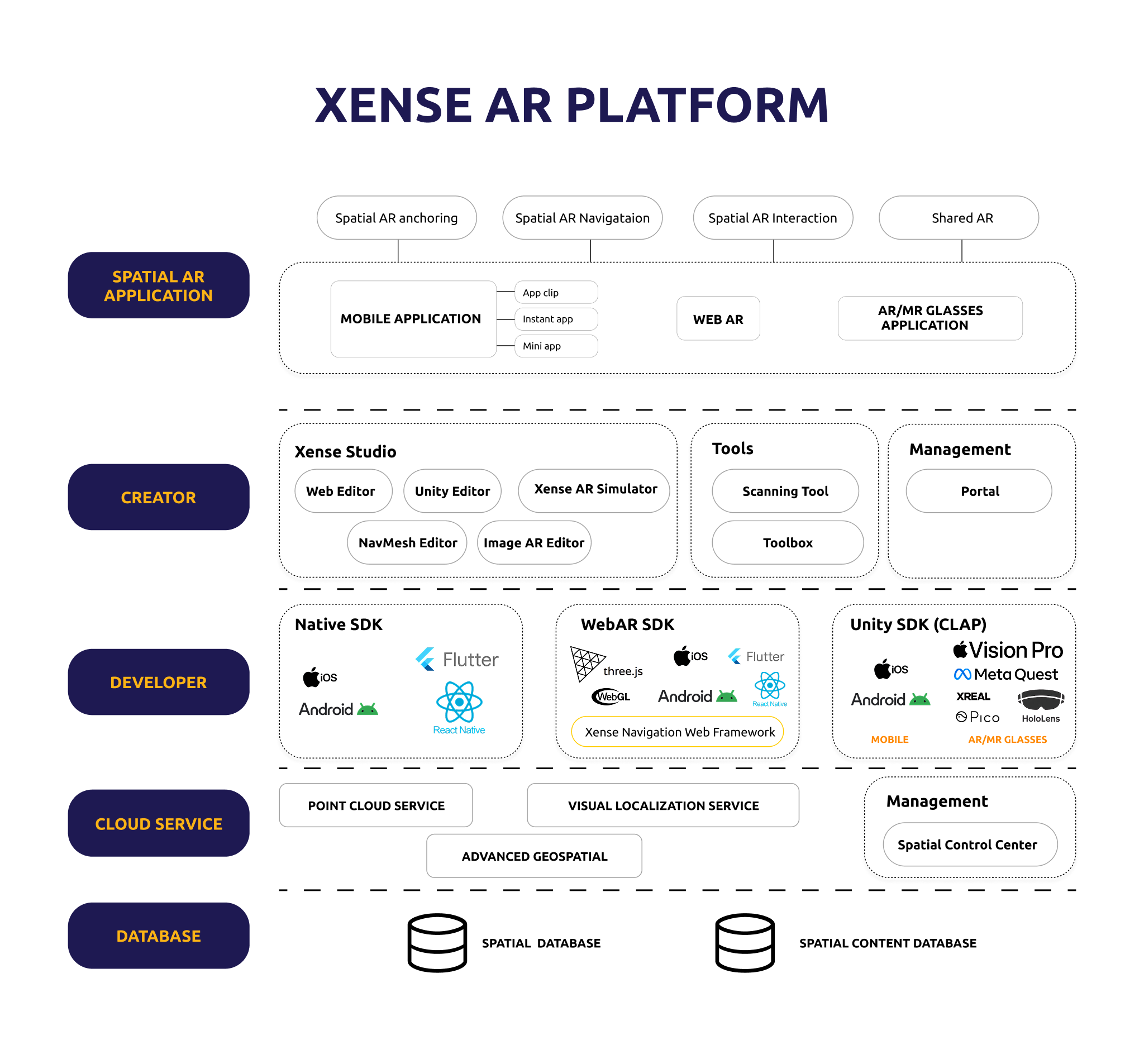
Logical architecture diagram of the Xense AR Platform
The diagram illustrates the overall roles and relationships between the components. The relationships shown in the diagram do not necessarily represent direct technical connections.
Platform Layers
| Layer | Main Components | Role |
|---|---|---|
| Spatial AR Application | Mobile Application, WebAR, AR/MR Glasses Application | Provides Spatial AR Anchoring, Navigation, Interaction, and Shared AR experiences to End Users |
| Creator | Xense Studio, Scanning Tool, Toolbox, Portal | Supports data collection, Spatial Map management, Spatial Content creation, and experience testing |
| Developer | Native SDK, WebAR SDK, Unity SDK (CLAP) | Enables developers to build Spatial AR applications on corresponding platforms |
| Cloud Service | Point Cloud Service, Visual Localization Service, Advanced Geospatial, Spatial Control Center | Processes spatial data, provides localization services, and supports platform operation management. Supports continuous areas of up to 500,000 m² with an accuracy of 10 cm |
| Database | Spatial Database, Spatial Content Database | Stores spatial data logic, content, and experience configuration |
Relationships Between Layers
The Creator layer provides tools for creating and managing Spatial Maps and Spatial Content. The Developer layer provides SDKs and frameworks for application development. Applications use the platform’s data and services to deliver Spatial AR experiences to End Users.
Cloud Service is responsible for data processing, localization, and platform management support. Database represents the groups of data used throughout the entire process.
Detailed information about the functionality, usage, and supported capabilities of each component is provided on the corresponding documentation pages.