Creator Tools Overview
The Xense AR Platform provides tools that help Creators create and manage Spatial AR experiences without having to build the entire technical system themselves.
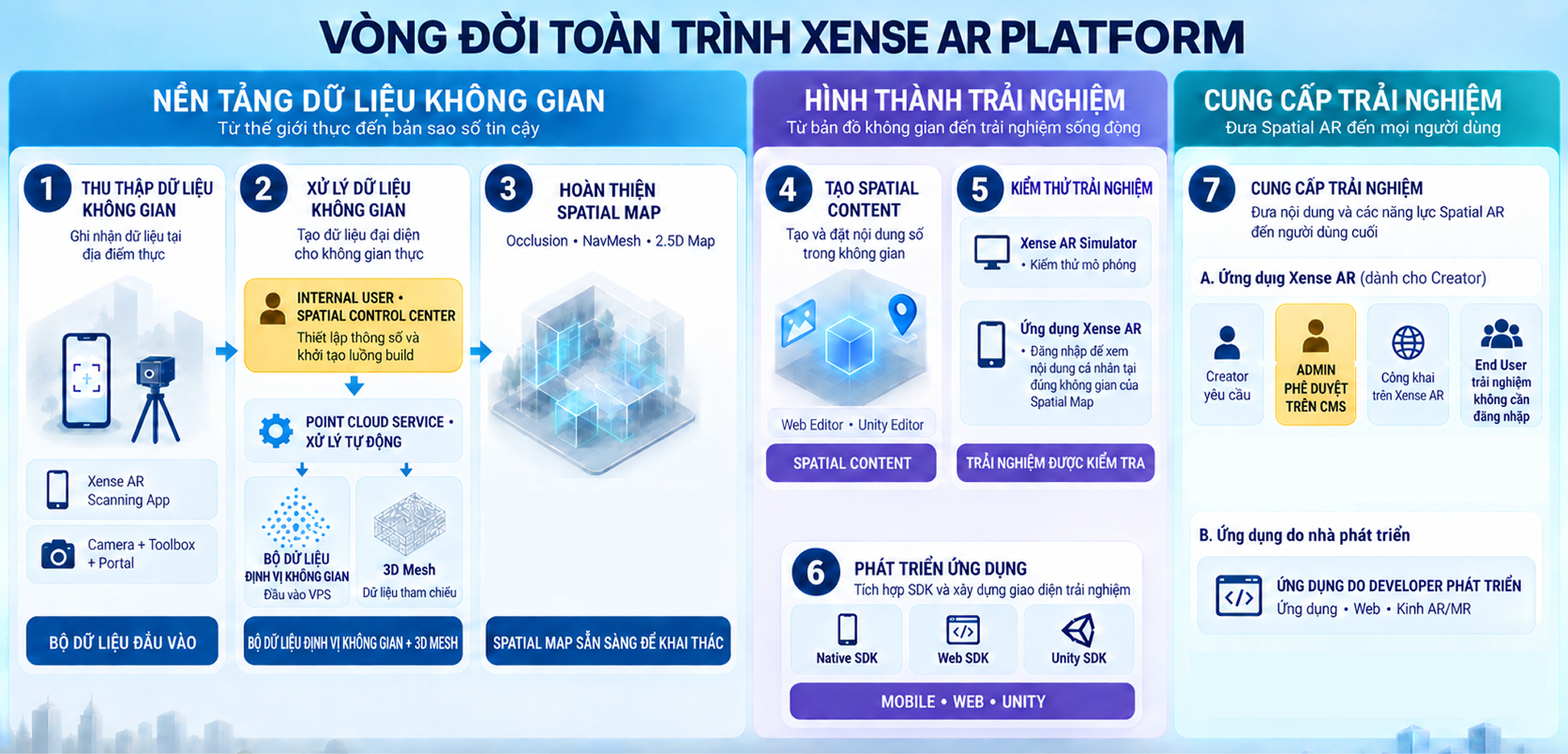
The Creator toolset supports the entire workflow:
Data Collection → Spatial Map Creation → Spatial Content Creation → Testing → Experience Delivery
Tool Categories
| Category | Components | Purpose |
|---|---|---|
| Management | Portal | Manage Spatial Maps, Content Projects, Credentials, and related resources |
| Data Collection | Xense AR Scanning App, Toolbox | Capture and upload spatial data to create Spatial Maps |
| Content Creation and Testing | Xense AR Studio | Create Spatial Content, configure Navigation, and test experiences |
Portal
Portal is the centralized management tool of the Xense AR Platform. Creators use Portal to manage accounts, Spatial Maps, Content Projects, Credentials, and access related tools.
Data Collection Tools
The Xense AR Scanning App and Toolbox support capturing data at real-world locations. After the data is uploaded and processed, it is used to create a Spatial Map.
The data collection method should be selected based on the device, space size, and requirements of each environment.
Xense AR Studio
Xense AR Studio is a suite of tools for content creation and testing, including:
- Web Editor;
- Unity Editor;
- Xense AR Simulator;
- NavMesh Editor;
- Image AR Editor.
Creators can use the appropriate tools to create and place content in the space, configure Navigation, complete Spatial Map data, or test experiences.
Choosing the Right Tool
| Requirement | Recommended Tool |
|---|---|
| Manage Spatial Maps and Projects | Portal |
| Collect data using a mobile device | Xense AR Scanning App |
| Collect data using a camera and supported devices | Toolbox |
| Create content directly on the Web | Web Editor |
| Create content in Unity | Unity Editor |
| Create Image Tracking content | Image AR Editor |
| Create and configure NavMesh | NavMesh Editor |
| Test experiences in a simulated environment | Xense AR Simulator |
See the corresponding documentation pages to learn more about the features and detailed usage instructions for each tool.